
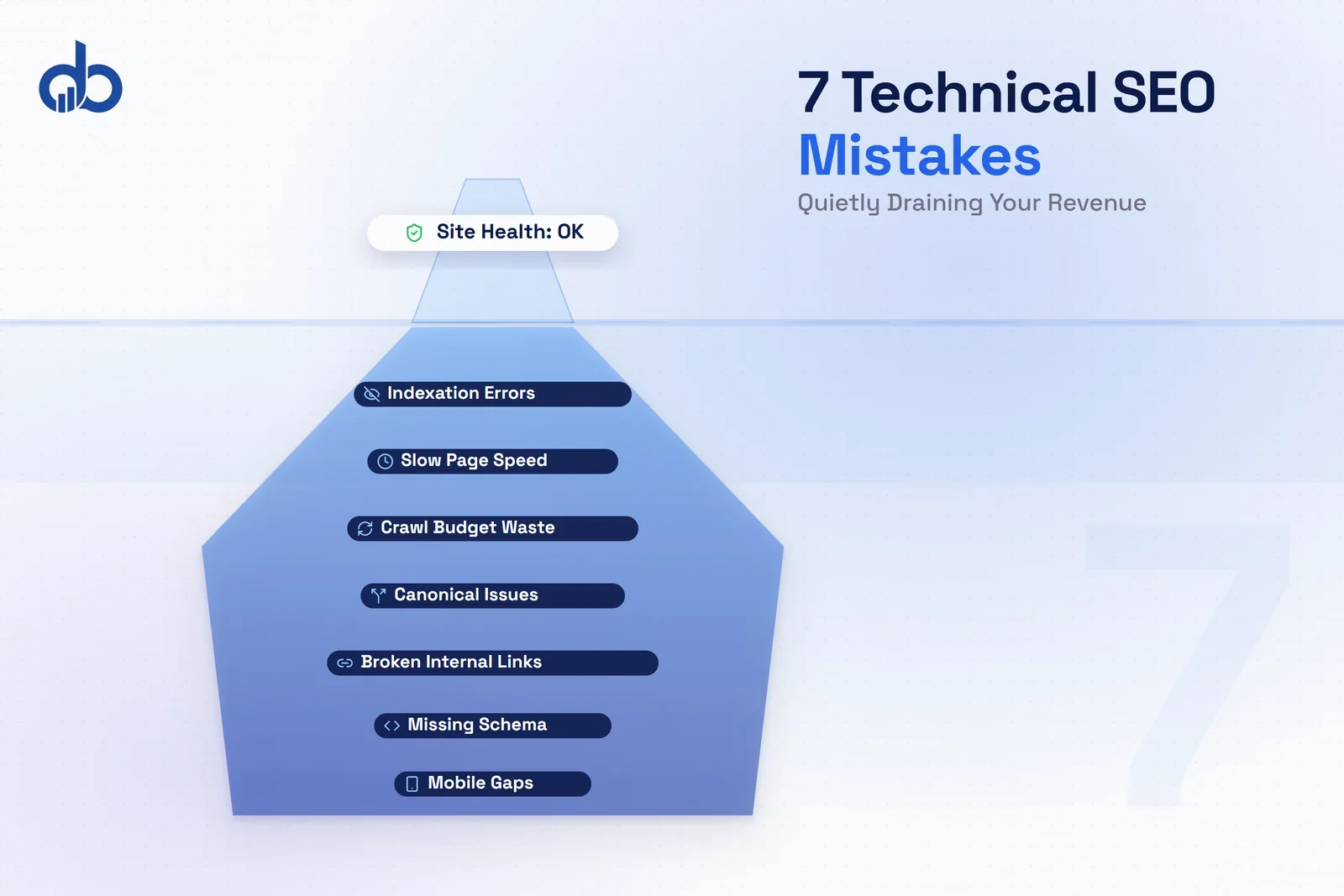
Your website passes every basic health check. No 404s in the dashboard, no obvious errors in Search Console. And yet organic revenue is flat or falling.
That’s the part nobody talks about.
The technical SEO mistakes that drain revenue most effectively aren’t the ones that trigger red warnings. They’re the ones that look fine on the surface while quietly suppressing your highest-value pages, wasting crawl budget on junk, and sending conversion signals to the wrong place.
A 200-item audit report isn’t a strategy. It’s a list. Most of those items won’t move your revenue one dollar in either direction. The seven website SEO issues in this article are different: they each create a direct, traceable path between a technical failure and a loss of organic income. And because they’re the same website SEO issues that recur across every industry, the fix order matters as much as the fixes themselves.
Why Technical SEO Mistakes Cost More Than Rankings
Most SEO advice frames technical issues as ranking problems. Fix the error, improve the position, get more traffic. That framing misses half the picture.
Rankings are an intermediate metric. Revenue is the real one.
A page that ranks in position 2 but loads in 6 seconds on mobile still converts at a fraction of its potential. An orphaned service page that never gets crawled earns zero traffic regardless of how well its content is optimized. A page in position 1 without FAQ schema loses clicks to a competitor in position 3 that has them.
This is what makes technical SEO errors uniquely damaging for SEO performance optimization: the cost is invisible. In a technical SEO audit, these gaps rarely surface as critical failures; they hide behind metrics that look healthy.
You see the ranking, not the conversion gap. You see organic traffic numbers, but not the sessions that never happened because Google couldn’t crawl the page in the first place.
Research from Portent found that conversion rates drop 4.42% for every additional second of load time in the 0 to 5 second window. That’s not a ranking signal. That’s revenue leaving the table on every page visit. And it doesn’t show up as an error in your dashboard.
Mistake 1: Slow Page Speed That Kills Conversions Before They Start
What goes wrong: Teams optimize page speed to pass audits rather than to protect revenue. They chase lab scores in Lighthouse without looking at which pages are actually slow for real users. More importantly, they don’t check which slow pages are their highest-value commercial pages.
Sound familiar?
Google’s Core Web Vitals measure three things: LCP (how fast the main content loads), INP (how fast the page responds to interactions), and CLS (how much the layout shifts while loading). Most sites focus on LCP because it’s the most visible metric. INP and CLS are often overlooked, even though a high CLS score on a checkout or contact page creates a jarring experience that pushes visitors away before they convert.
The numbers are stark. According to Google and Think with Google, 53% of mobile visitors abandon a page that takes more than 3 seconds to load. Sites with good Core Web Vitals see 32% higher organic traffic growth compared to sites with poor scores.
The revenue framing: A 0.1-second improvement in LCP on a high-traffic commercial page (a service page, a pricing page, a landing page) can recover meaningful conversion volume. But most technical SEO audits report average page speed across the whole site. That hides the fact that your most important pages might be the slowest ones.
Sort your pages by revenue contribution before running speed diagnostics. A blog post loading in 5 seconds costs you almost nothing. A pricing page loading in 5 seconds can cost you dozens of inquiries a month. Fix in revenue order, not URL order.
How to fix it: Use PageSpeed Insights with the Chrome User Experience Report (CrUX) data. This shows real-user performance, not just lab scores. Then fix in commercial priority order: service pages first, then landing pages, then blog content.
Common culprits: unoptimized images, render-blocking JavaScript, poor server response time (TTFB), and third-party scripts (chat widgets, analytics, ad pixels) that load synchronously on commercial pages.
Mistake 2: Mobile Usability Gaps Under Google’s Microscope
What goes wrong: Most sites are technically mobile-responsive. The layout adjusts to screen size. But responsive design and mobile optimization aren’t the same thing. And Google has used mobile-first indexing since 2019, which means the mobile version of your page is the version Google indexes and ranks. If your mobile and desktop versions differ, you’re being ranked on the mobile experience.
Here’s where it gets tricky.
The critical gap most technical SEO audits miss: structured data, content, and internal links present on the desktop version but absent or hidden on the mobile version. If your desktop page has FAQ schema but your mobile layout collapses that section with display: none, Google may not index that schema at all.
HubSpot research found that 70% of websites have mobile usability issues of some kind. Even sites that appear mobile-friendly to casual inspection.
The revenue framing: If your mobile version is missing content that your desktop version has, you’re being ranked on an incomplete version of your own site. Every piece of content, schema, and internal link that exists only on desktop is invisible to Google under mobile-first indexing.
How to fix it: Start with Google Search Console’s Mobile Usability report to surface explicit errors. Then use Chrome DevTools device emulation to compare desktop versus mobile content: check that core body copy, all headings, schema markup, and internal links are present on the mobile view. Use GSC’s URL Inspection tool on your most important commercial pages and review the rendered HTML.
Mistake 3: Crawl Budget Wasted on Low-Value Pages
What goes wrong: Googlebot has a finite number of pages it will crawl on your site in a given period. For small sites with clean architecture, this rarely matters. But for sites with 500 or more pages, e-commerce with faceted navigation, or sites that generate URL variations through parameters, crawl budget becomes a real constraint.
Common crawl budget killers: session IDs appended to URLs (each creates a unique URL for the same content), sort and filter parameters from e-commerce (like ?color=red&size=large&sort=price), paginated archive pages with no unique content, and CMS-generated tag and category pages that duplicate post content with minor variations.
The revenue framing: If Googlebot is spending crawl budget on thousands of low-value parameter URLs, your most important commercial pages get crawled less frequently. New content takes longer to be discovered, updated pages take longer to reflect in rankings, and recently-added product or service pages may sit unindexed for weeks.
This mistake is almost invisible in standard SEO reporting tools. The only reliable way to catch it is Google Search Console's Crawl Stats report. If you see a large percentage of crawl time spent on parameterized or archive URLs, that's where your budget is bleeding.
How to fix it: Google Search Console > Settings > Crawl Stats shows you what Google is actually spending time crawling. If the breakdown shows a large proportion of time on parameterized or archive URLs, act.
Block low-value parameter URLs via robots.txt, apply noindex to thin tag and archive pages that must remain accessible, and make sure your XML sitemap only includes canonical, indexable URLs. Don’t include parameter URLs in your sitemap. That actively invites Googlebot to crawl them.
Mistake 4: Broken Internal Links and Orphaned Pages Leaking Authority
What goes wrong: Internal linking is often treated as an afterthought. Something to add when writing new content rather than a structural system that distributes authority to the pages that need it most. Two problems compound each other here.
First: broken internal links. Every broken link on a page wastes a portion of that page’s link equity; it flows to a dead end instead of a live page. Across a site with hundreds of posts, this adds up to a significant loss of distributable authority.
Second: orphaned pages. These are pages with no internal links pointing to them. Googlebot discovers pages primarily by following links, so a page with no internal links pointing to it may not be crawled regularly or reliably. Even if it’s in your sitemap.
Research from Ahrefs found that pages with 11 or more internal link anchors receive 13 times more SEO visits than pages that are weakly linked. That multiplier applies directly to your highest-value pages.
The revenue framing: Your highest-converting service page or product landing page may be sitting in the middle of your site architecture with two internal links pointing to it. Passed over in every crawl, ranking well below its potential. This is invisible in standard traffic dashboards.
How to fix it: Crawl your site with Screaming Frog (free up to 500 URLs). Export pages by inlink count and sort ascending. Any page with 0 or 1 internal links that matters commercially needs immediate attention.
Build a linking hierarchy: homepage links to main category and service pages, those link to specific sub-service or product pages, and blog content links to both category pages and relevant commercial pages. Every blog post should include at least one contextual link to a commercial page on the site.
Mistake 5: Duplicate Content Without Canonical Tags
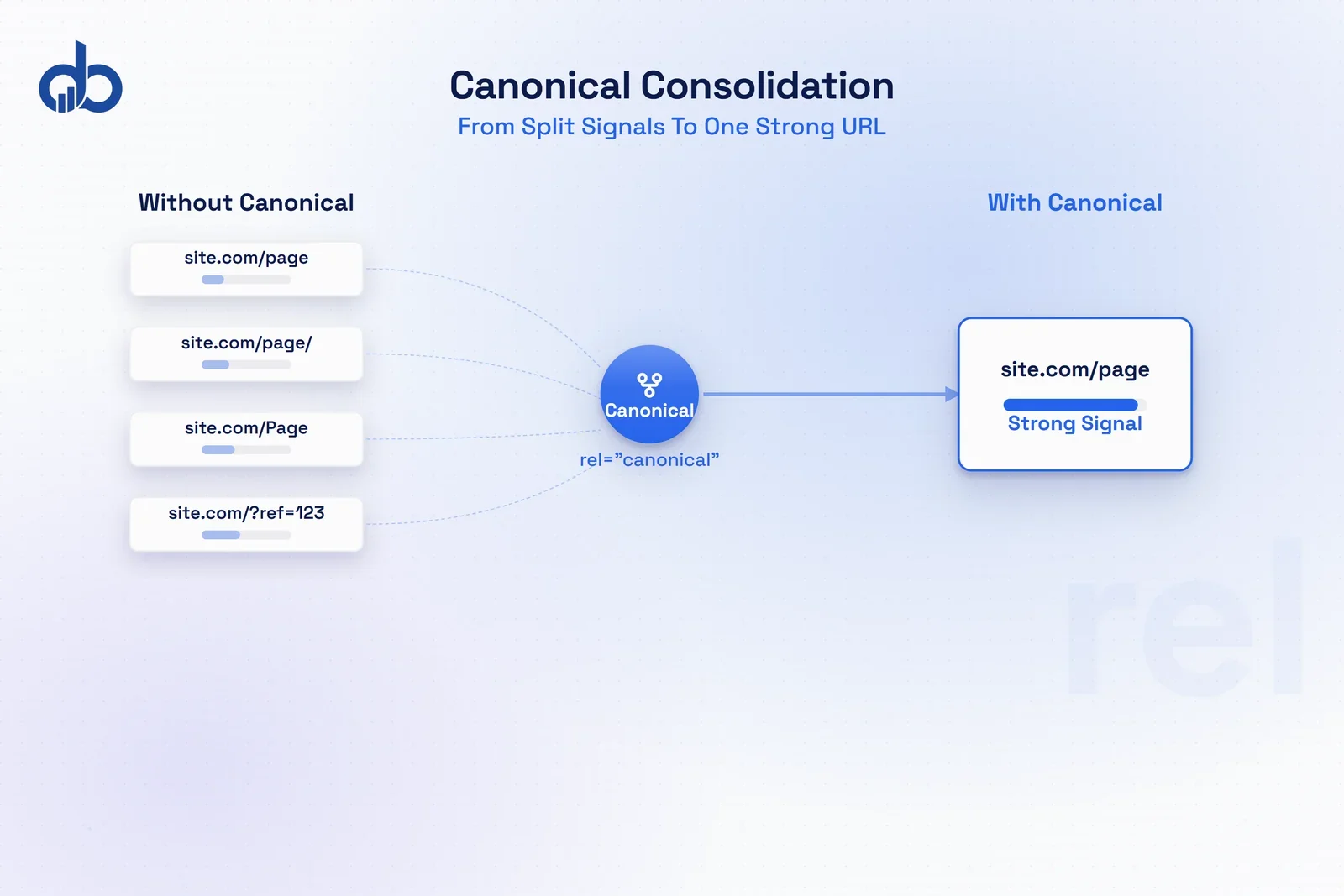
What goes wrong: Duplicate content is one of the most common technical SEO mistakes, and most of it is accidental. Sites generate URL variations through CMS defaults, redirect configurations, and e-commerce functionality. Each variation can present as a separate page to Google.
Common sources of unintentional duplicates: HTTP versus HTTPS versions of the same page (when redirects aren’t enforced), www versus non-www variants, trailing slash versus no trailing slash, print-friendly page versions, CMS-generated tag and category archive pages that pull the same post content, and product pages with different sort parameters.
According to Semrush research, 29% of websites face duplicate content issues affecting their rankings. The impact isn’t a penalty. It’s a dilution. When the same content exists across three URL variants, Google splits ranking signals across all three instead of consolidating them into one strong signal.
The revenue framing: A service page that exists on four different URL variants is competing against itself. None of those URLs ranks as strongly as one consolidated canonical URL would.
How to fix it: Start with a site audit in Screaming Frog or Semrush to identify missing, incorrect, or non-self-referencing canonical tags. Every page should have a canonical tag pointing to its preferred URL, including pages that are already the canonical version (a self-referencing canonical).
Enforce a single URL variant via 301 redirects. All HTTP versions should redirect to HTTPS, all non-www should redirect to www (or vice versa), and trailing slash versus no trailing slash should be consistent and redirected. Once redirects are in place, update internal links to point directly to the canonical URL to reduce redirect hops.
Mistake 6: Missing Schema Markup Costing You Rich Results
What goes wrong: Structured data is optional in the technical sense. Google doesn’t require it to index your page. But missing schema markup means missing rich result eligibility, and rich results change click-through rates significantly.
According to the Web Almanac 2024, only 30% of pages use any schema markup. Despite the fact that implementing it is straightforward and the upside is measurable. Research from Searchmetrics found that pages with rich results achieve 58% click-through rate compared to 41% for equivalent non-rich result listings.
That 17-point gap in click-through rate isn’t a ranking change. Your position stays the same. You simply get far more clicks from it.
Google supports schema types for Article, FAQ, HowTo, Product, Review, BreadcrumbList, LocalBusiness, Service, and more. Each type unlocks different rich result formats in the search results.
The revenue framing: A position-3 page with FAQ rich results that expand to show three questions and answers can out-click a position-1 page without any rich results. Schema is a CTR multiplier that most sites leave unclaimed, often because it’s never flagged in a basic technical SEO audit.
Start with FAQ schema on your most competitive pages rather than trying to implement every schema type at once. FAQ rich results are one of the highest-impact additions per hour of implementation time, especially on service pages and high-intent blog content.
How to fix it: Test your core pages with Google’s Rich Results Test. Start with the schema types that offer the highest CTR impact for your site: FAQ and Article for content-heavy sites, LocalBusiness and Service for service businesses, Product and Review for e-commerce.
Check implementation in Search Console under Enhancements. This shows validation errors and tracks which schema types Google has detected. Fix validation errors before worrying about adding new schema types. And don’t overdo it. Marking up content that doesn’t genuinely match the schema type risks a manual action.
Mistake 7: Indexation Errors Hiding Your Best Pages
What goes wrong: Pages you want ranked are either blocked by robots.txt, tagged with noindex, or buried in broken redirect chains. This is the most directly revenue-impacting mistake on this list.
A page Google can’t index earns zero organic traffic. It doesn’t matter how good the content is, how many backlinks point to it, or how well-optimized every on-page element is. It simply doesn’t exist for Google.
Common scenarios: a staging site noindex tag that wasn’t removed on launch (this happens more often than agencies will admit), a robots.txt file that disallows CSS or JavaScript directories (preventing Google from rendering the page correctly), and redirect chains of three or more hops that dilute link equity to the point of ineffectiveness.
The revenue framing: A service page with a noindex tag left from staging doesn’t rank. It doesn’t appear in Google at all. No SEO optimization can overcome it. Yet it can sit undetected for months because it looks like a live, functional page to anyone who visits it directly.
How to fix it: In Google Search Console, go to Pages > Not Indexed, then filter by reason: robots.txt blocked, noindex tag, redirect error. Work through each category.
Check your robots.txt directly by visiting yoursite.com/robots.txt. Look for any Disallow rules that might catch CSS directories, JavaScript folders, or commercial URL paths. Use the robots.txt tester in GSC to verify specific URLs against the current file.
For redirect chains, export all redirects from Screaming Frog and filter for chains with three or more hops. Collapse each chain to a single direct 301 redirect pointing from the original URL to the final destination. Every hop in a chain loses a portion of the link equity being passed.
Common questions on this:
“How do we even know if we have a noindex issue on a page that’s already live?”
The fastest check is Google Search Console > URL Inspection on any page you’re not sure about. If the verdict says “URL is on Google” with a green checkmark, it’s indexed. If it says “URL is not on Google” and lists noindex as the reason, you’ve found one. Run this on all your commercial pages before assuming clean indexation.
“We fixed a robots.txt block six months ago but the pages still aren’t ranking. Why?”
Fixing the block tells Google it can now crawl the page. But Google still needs to crawl it, render it, and then re-evaluate it for ranking. On a site where crawl budget is thin, this can take weeks. Submit the page via URL Inspection in GSC after fixing to trigger a recrawl request. That won’t guarantee immediate indexing, but it speeds up the queue.
How to Prioritize Technical SEO Fixes for Maximum Revenue Impact
Here’s the dominant advice you’ll find from 90% of technical SEO audit content: fix all your technical errors and your rankings will improve. Run the audit. Work through the list.
The reality is different.
Most technical SEO mistakes are optimization theater: small improvements to metrics that sound meaningful but don’t move organic revenue. Fixing a missing image alt tag on a sidebar image won’t change anything. Running a crawl, finding 847 issues, and resolving them in random order isn’t a strategy.
The seven technical SEO mistakes above are different because each one creates a direct path to revenue loss. But even within these seven, order matters.
Here’s how to improve technical SEO in the sequence that produces the fastest return:
- Indexation errors first. If Google can’t see the page, nothing else matters. Fix robots.txt blocks, noindex tags, and redirect chains before any other work.
- Page speed on commercial pages. Not global averages. Check your service pages, landing pages, and pricing pages specifically. A fast blog and a slow service page is still a revenue problem.
- Crawl budget (but only if warranted). If your site is under 500 pages with no faceted navigation, crawl budget is unlikely to be a material issue. Prioritize it only for large or complex sites.
- Canonical and duplicate cleanup before any content investment. Adding new content to a site with duplicate URL issues splits the ranking signals further. Clean the foundation first.
- Internal links, immediately after content is in place. Every new page should be linked from at least two existing pages before it’s published. Retroactively add links to high-value pages that are underlinked.
- Schema markup: on top of clean, indexed, fast pages. Schema amplifies pages that already rank. It can’t rescue pages Google can’t access or that load too slowly to convert.
- Mobile usability: ongoing monitoring. Run a mobile usability check after every site update or CMS version change. Not just once a year.
The sequence above works because it runs from hard constraints to multipliers. Indexation errors are binary: the page is in Google or it isn't. Everything below that threshold is optimization. Most teams skip to optimization and wonder why results are flat.
The difference between a useful technical SEO audit and an overwhelming one isn’t the number of issues found. It’s whether the issues are ranked by revenue impact and given a fix order that reflects business priorities. Every time you improve technical SEO with this framework — indexation first, then speed, then structure — you’re working from the constraint that most limits revenue to the refinements that multiply it.
The sites that see the most impact from SEO performance optimization are the ones that fix in revenue order, not audit-report order.
The Bottom Line
The most damaging technical SEO mistakes are the ones that look normal in your dashboard. A page loading in 5 seconds shows up as a live page. A service page with a noindex tag shows up in your CMS as published. A key landing page with two inlinks looks fine until you check how rarely Google actually crawls it.
An audit that produces a 200-item list without a priority order isn’t a deliverable. It’s a delay.
Start with what keeps pages out of Google’s index. Then fix what reduces their revenue impact once they’re in. And use the framework above to work through improvements to technical SEO in the sequence that produces the fastest return.
If you want to know exactly which of these seven website SEO issues are affecting your site and in what order they’re costing you revenue, a diagnostic audit focused on your highest-value pages will give you a clear answer.
Find out which technical SEO mistakes are quietly draining your revenue. Get a free marketing audit from Digiblazon
- Technical SEO mistakes that drain the most revenue are often invisible in dashboards — they don't trigger alerts but suppress your highest-value pages.
- Fix in revenue order, not audit-report order: indexation errors first, then page speed on commercial pages, then crawl budget, canonicals, internal links, schema, and mobile usability.
- 53% of mobile visitors abandon pages that take over 3 seconds to load — page speed is a direct revenue problem, not just a ranking signal.
- Orphaned pages with 0–1 internal links get crawled unreliably; pages with 11 or more internal links receive 13 times more SEO visits.
- Missing schema markup means missing rich results — pages with rich results achieve 58% CTR compared to 41% without them.
- A noindex tag left from staging can hide a page from Google entirely while it still appears live in your CMS.
- A useful technical SEO audit prioritizes issues by revenue impact, not error count — the fix order matters as much as the fixes themselves.
Frequently Asked Questions
What should a technical SEO audit cover?
A technical SEO audit should cover crawlability (robots.txt, sitemaps, redirect chains), indexation (noindex tags, canonical errors), page speed and Core Web Vitals, mobile usability, internal linking structure, duplicate content, and structured data. The goal isn't to produce a list of every error. It's to identify which issues have the highest revenue impact for your specific site.
How long does it take to fix technical SEO issues?
Quick wins (fixing broken redirects, adding canonical tags, resolving noindex errors) can be done in days and often show ranking improvement within 2 to 4 weeks. Structural changes like site architecture or Core Web Vitals improvements take longer to implement and may take 4 to 12 weeks to show measurable organic results.
What is crawl budget and why does it matter?
Crawl budget is the number of pages Googlebot crawls on your site within a given timeframe. If your site wastes crawl budget on duplicate URLs, filtered pages, or session IDs, Google may not crawl your most important commercial pages as frequently. That means new or updated content takes longer to rank.
How often should I run a technical SEO audit?
For most sites, a full technical SEO audit every 6 months is the baseline. After major site changes (CMS migrations, URL restructures, new product launches), run an audit immediately. Use ongoing monitoring tools (Google Search Console, Screaming Frog scheduled crawls) to catch critical issues between full audits.