
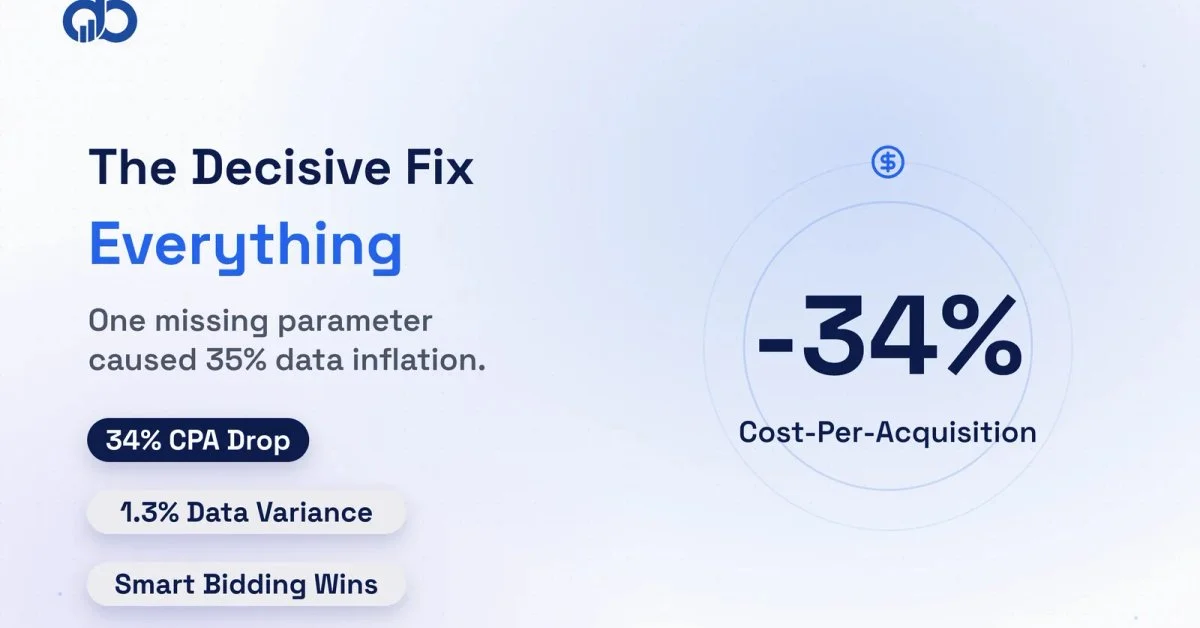
Every ecommerce marketing manager we talk to describes the same situation. They open GA4 and see 400-plus conversions reported for the month. They open Shopify. There are 280 actual orders. That’s not a rounding error. It’s a structural problem in their GA4 conversion tracking that’s been quietly inflating their data for months.
It’s not a rare edge case, either. This is the baseline condition for most ecommerce businesses running GA4 today. The setup looks complete on the surface. Events are firing, conversions are showing, reports are populated. But the numbers don’t match reality, and every budget decision made on that data is built on a broken foundation.
This is the story of a mid-size fashion accessories brand on Shopify spending $40,000 per month on Google Ads. They came to Digiblazon’s Analytics and Tracking team after their finance director flagged a persistent 35% gap between GA4 revenue reports and actual Shopify order revenue. What we found wasn’t a minor configuration error. It was a systemic GA4 conversion tracking problem feeding corrupted data into Google’s Smart Bidding algorithm for over six months.
Here is exactly what we found, what we fixed, and what changed when the data was clean.
Why This Brand Was Spending $40K a Month on Ads With No Idea What Was Working
Their marketing manager had been running Google Ads campaigns with target CPA bidding for eight months. GA4 showed 420 purchase conversions in the most recent month. The Shopify backend showed 310 completed orders. That 35% gap represented roughly $47,000 in reported revenue that didn’t exist.
The practical consequences were severe. Google’s Smart Bidding algorithm was consuming those 420 phantom conversions as real signals. It was building audience models and bidding strategies around users who appeared to convert but often hadn’t. The algorithm was overbidding on sessions that triggered duplicate purchase events without any actual sales behind them.
Campaigns were being paused based on GA4 CPA data. Good campaigns were being cut not because they were generating bad results, but because GA4 was reporting an inflated cost-per-acquisition. The real CPA was lower. The flawed setup stayed untouched.
Could your GA4 data be making the same mistake? Get Free Marketing Audit
Their finance team had flagged the gap early and chalked it up to GA4’s known attribution modeling. It wasn’t attribution modeling. It was duplicate purchase events firing on every order, with no deduplication mechanism in place.
Why Standard GA4 Setup Failed Them
The brand had a “standard” GA4 ecommerce setup from their previous digital agency, done 18 months prior. On the surface, it looked right. GA4 was receiving purchase events. Google Ads was linked. Conversion actions were configured. Three specific failure points were compounding behind the scenes to create the phantom conversion problem.
Failure Point 1: Two tracking sources running at the same time
The Shopify store had both the native Shopify GA4 sales channel enabled and a separate GTM-based purchase event tag running in parallel. Both were pushing purchase events to the same GA4 property. Every completed order generated two purchase events: one from Shopify’s native integration and one from GTM.
Failure Point 2: No transaction_id on the GTM purchase event
This is where the deduplication problem starts. GA4 has a built-in deduplication mechanism for purchase events. It works by comparing transaction_id values within a 24-hour window. If two purchase events arrive with the same transaction_id, GA4 discards the duplicate.
The GTM-based purchase tag wasn’t passing a transaction_id parameter. Without it, GA4 had no way to tell that two events were the same order. It recorded both as unique purchases. The duplicate was invisible in standard GA4 reports.
Failure Point 3: Mobile confirmation page reload
Shopify’s order confirmation page was triggering a redirect on mobile browsers. The page loaded, fired the GTM purchase tag, then redirected to a confirmation URL and loaded again, firing the purchase tag a second time. With no transaction_id to catch the duplicate, GA4 counted both events.
Here’s the insight most GA4 setup guides miss entirely. The problem with e-commerce conversion tracking is rarely missing events. Most ecommerce brands actually have too many events firing. Or more precisely, the same event firing multiple times with no deduplication protection.
According to Google’s own Analytics documentation, transaction_id deduplication is the recommended approach for preventing duplicate purchase events. It requires intentional implementation. It’s not automatic. Without it, any page reload or double tag fire inflates your conversion counts.
Is your GA4 reporting more conversions than your backend shows? Get Free Marketing Audit
How We Rebuilt GA4 Conversion Tracking in 3 Phases
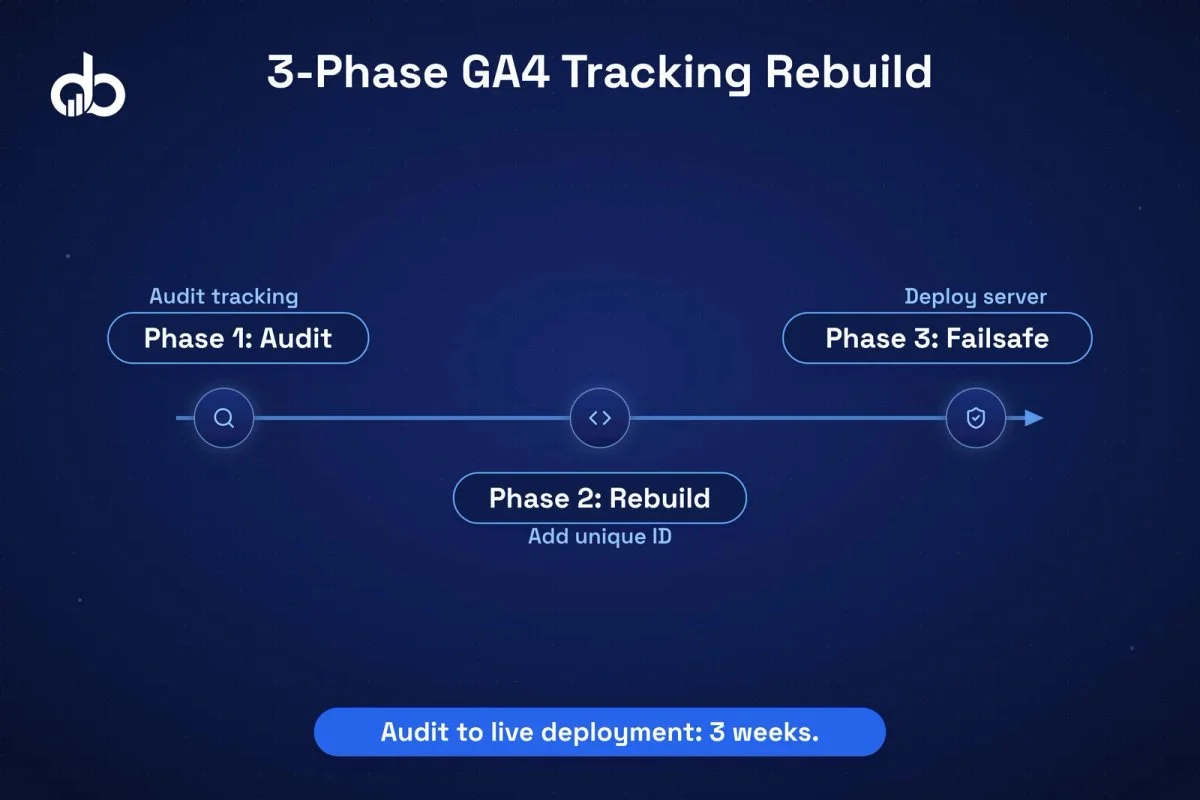
The rebuild took three weeks from audit to live deployment. We structured it in three phases: kill the duplicate source, rebuild the purchase event correctly, and add a server-side failsafe.
Phase 1: Audit and eliminate the duplicate source
The first call was straightforward. We disabled Shopify’s native GA4 sales channel and made Google Tag Manager the single source of truth for all GA4 conversion tracking. Running two tracking sources simultaneously is one of the most common setup errors we see, usually introduced during agency handoffs or platform migrations.
After disabling the Shopify native channel, we watched GA4 DebugView with test orders. Purchase counts dropped immediately by about 30%, confirming the dual-source duplication was real.
Phase 2: Purchase event rebuild with complete parameters
We rebuilt the GTM purchase tag from scratch. The previous implementation was sending a basic purchase event with value and currency but missing the transaction_id, items array, and several required ecommerce parameters.
The rebuilt tag pushed a complete dataLayer object:
`js
dataLayer.push({
event: ‘purchase’,
ecommerce: {
transaction_id: ‘{{Order ID}}’, // mapped from Shopify order number
value: ‘{{Order Total}}’,
currency: ‘USD’,
items: [{
item_id: ‘{{Product SKU}}’,
item_name: ‘{{Product Name}}’,
price: ‘{{Product Price}}’,
quantity: ‘{{Product Quantity}}’
}]
}
});
`
The transaction_id variable was mapped directly from Shopify’s order confirmation page liquid template, pulling the actual order ID. Every purchase event now carried a unique, server-generated identifier that GA4 could use for deduplication.
We also rebuilt the items array. The old implementation passed a flat array with no item_id, item_name, or price. GA4’s ecommerce reports depend on the items array for product-level revenue attribution. Without it, you get purchase counts but no product revenue breakdown. That gap makes it impossible to understand which product categories drive conversion volume versus which drive actual margin. We added all required parameters: item_id from the product SKU, item_name, price, and quantity for every line item in the order.
Always generate transaction_id from your order management system, not from JavaScript. If your JS generates the ID, a page reload creates a new ID and GA4 treats it as a second unique order. Pull it from your Shopify order object or backend confirmation response.
Phase 3: Server-side failsafe
We deployed a server-side GTM container to catch purchase events that client-side tracking misses. Safari’s Intelligent Tracking Prevention and ad blockers block a meaningful share of client-side events. Server-side tracking providers report recovering 15-25% of purchase events that client-side loses to browser restrictions.
The server-side container also deduplicates against client-side events using the same transaction_id. If both fire for the same order, GA4 discards the second one.
After implementing transaction_id deduplication, run a 48-hour test with real orders. GA4 purchases should match your Shopify order count within 2-3%. Still diverging? Use GA4 DebugView to check whether the transaction_id is actually being passed correctly in each event.
A solid GA4 ecommerce setup that combines transaction_id, server-side failsafe, and dataLayer validation gives you the foundation for reliable conversion tracking implementation across your entire paid media stack.
From 420 Ghost Conversions to 310 Verified Purchases and 34% Lower CPA
Results don’t appear overnight. Clean data needs time to propagate through Google’s Smart Bidding system before campaign performance actually reflects the improvement.
Here’s the timeline:
- Weeks 1-2: Audit and rebuild complete, new tracking deployed to staging
- Week 3: Live deployment, real-time monitoring in GA4 DebugView
- Weeks 3-4: Data stabilization, comparing GA4 purchases to Shopify orders daily
- Weeks 5-8: Google Ads Smart Bidding re-calibration on clean conversion signals
- Week 10: First full 30-day period with clean data for comparison
Results at day 60:
| Metric | Before Fix | After Fix | Change |
|---|---|---|---|
| GA4 Purchase Events/Month | 420 | 312 | -26% (phantom conversions removed) |
| Shopify Orders/Month | 310 | 308 | Essentially flat (real orders unchanged) |
| Google Ads CPA | $128 | $84 | -34% |
| Google Ads ROAS | 2.1x | 2.7x | +28% |
| GA4 vs Backend Variance | 35% gap | 1.3% gap | Near-perfect reconciliation |
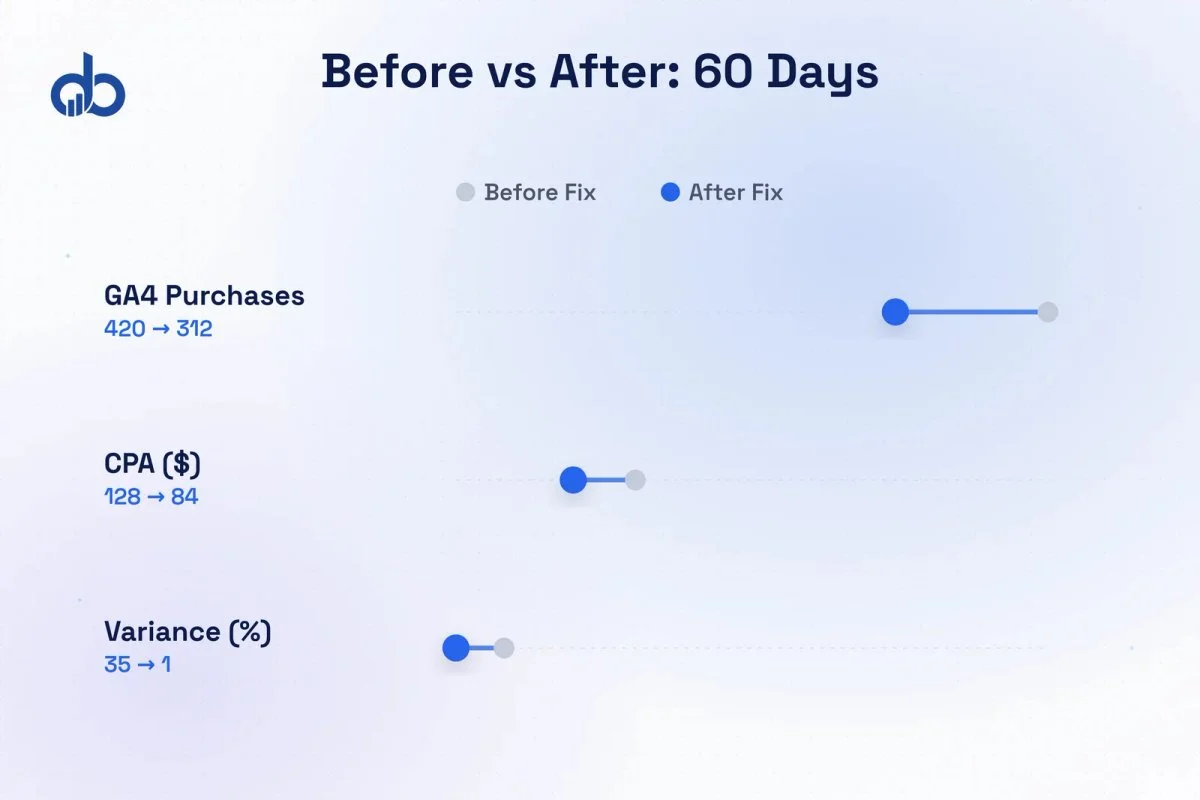
The 34% CPA drop didn’t come from spending less or bidding differently. It came from Smart Bidding finally receiving accurate conversion signals. Once the phantom conversions were gone, the algorithm stopped overbidding on sessions that had triggered duplicate events. It tightened its bidding and found users who were actually purchasing.
Could clean GA4 data cut your CPA by 30%? Get Free Marketing Audit
Finance could now reconcile GA4 revenue against Shopify within a 1.3% variance, down from 35%. That changed how the entire brand approached budget planning. Marketing and finance were finally working from the same numbers.
The One Configuration Decision That Changed Everything
For any e-commerce conversion tracking setup, transaction_id isn’t optional. It’s the foundation of data integrity.
Without it, GA4 can’t distinguish between a genuine second purchase and a duplicate event from the same order. The platform has no way to tell whether two purchase events represent two customers or two firings of the same tag. It treats every event as unique by default.
With transaction_id in place, GA4 deduplicates within a 24-hour window. If a purchase event arrives from both client-side GTM and server-side GTM with the same transaction_id, GA4 discards the second. If the Shopify confirmation page reloads and fires the tag twice, GA4 discards the second. Deduplication is automatic once the parameter is present and correctly mapped.
So why do most GA4 ecommerce setups miss this? A few reasons:
- Standard GTM templates and Shopify GA4 integrations often omit transaction_id or pass it as a hardcoded test value that was never updated after development
- Agencies implementing GA4 for the first time tend to follow setup guides focused on getting events to fire, not on deduplication
- The problem doesn’t show up in standard GA4 reports. You need to compare GA4 purchase counts to backend order counts to catch it.
Open your GA4 purchase events in DebugView during a test order. Look for the transaction_id field. If it's absent, or if you see the same value on repeated test orders, you've got a deduplication gap. Fix this before connecting GA4 to Google Ads as a conversion source.
This one parameter change was the decisive factor in this case study. Everything else in the rebuild improved data quality incrementally. Fixing the transaction_id gap fixed the core problem.
Digiblazon’s Analytics and Tracking service covers this audit as a standard part of every new client onboarding. We find this exact issue in the majority of ecommerce GA4 setups we inherit.
What E-Commerce Brands Can Apply from This Case Study
The patterns in this case study aren’t unique to one brand or one platform. We see the same issues across Shopify, WooCommerce, and Magento. Here’s what applies broadly.
Audit before you add
Most ecommerce brands have more tracking than they realize. GA4 ecommerce setup errors are more often about duplicate signals than missing ones. Before adding new tags or events, audit what’s already firing and confirm each event has a single source.
transaction_id is non-negotiable
It’s the most commonly skipped parameter in GA4 purchase event implementation. A proper GA4 ecommerce tracking setup makes this a required field, not an optional one. If your current setup doesn’t pass a unique, server-generated transaction_id on every purchase event, you don’t have reliable conversion data. Full stop.
Reconcile GA4 against your backend every month
Pull your GA4 purchase count and compare it to your Shopify or WooCommerce order count for the same period. The variance should be under 5%. If it’s higher, something’s broken. Build a simple monthly spreadsheet: GA4 purchases, backend orders, variance percentage. If the number creeps past 5%, investigate before the next campaign budget cycle begins. Most teams skip this because it’s manual work. That’s exactly why the problem hides for months.
Smart Bidding is only as good as your conversion data
Every automated bidding strategy in Google Ads relies on the conversion signals you feed it. An inflated GA4 conversion count doesn’t make Smart Bidding perform better. It makes the algorithm optimize for a phantom signal and spend real budget against it. Fixing your conversion tracking implementation isn’t a reporting project. It’s a media efficiency project.
The brands that get the most from GA4 aren’t the ones with the most events configured. They’re the ones who’ve verified every key event is accurate, deduplicated, and feeding clean data into their bidding algorithms. GA4 ecommerce setup done correctly is a competitive advantage. Smart Bidding on clean data will consistently outperform the same campaign on dirty data, because the algorithm finds the real buyers instead of ghost sessions.
Ready to verify your GA4 ecommerce setup is counting correctly? Get Free Marketing Audit
Conclusion
When GA4 doesn’t match what your backend shows, you’re not dealing with a reporting gap. You’re dealing with a decision-making gap. This brand spent six months optimizing campaigns on data that was 35% inflated. Fixing the GA4 conversion tracking setup brought the CPA down by 34% without changing a single campaign. If you want to know whether your GA4 ecommerce setup has the same problem, Digiblazon’s Analytics and Tracking service starts with a full conversion tracking audit. One conversation could be worth months of clean data.
Your GA4 Setup May Be Counting the Same Purchase Twice
Our Analytics and Tracking audit finds and fixes conversion event errors before they cost you more budget.
- GA4 often double-counts purchase events when both Shopify's native integration and Google Tag Manager fire simultaneously — the gap between GA4 and backend orders is the diagnostic signal.
- The
transaction_idparameter is the single most important field for GA4 purchase deduplication; omitting it means GA4 cannot distinguish real purchases from duplicate tag fires. - Fixing inflated conversion counts typically reduces reported CPA and improves Smart Bidding performance, as the algorithm stops optimizing toward phantom signals.
- Reconcile GA4 purchase counts against backend orders monthly — a variance above 5% indicates a tracking error that should be resolved before relying on GA4 for budget decisions.
- Server-side GTM combined with client-side deduplication creates a two-layer defense against duplicate events across page reloads, Shopify confirmation page variants, and cross-device scenarios.
Frequently Asked Questions
Why does GA4 show more purchases than my Shopify backend?
This usually means your GA4 setup is firing the purchase event more than once per order. Common causes include both Shopify's native GA4 integration and Google Tag Manager running simultaneously, or the order confirmation page reloading and firing the tag again. The fix is to implement transaction_id deduplication and consolidate your tracking to a single event source.
What is the transaction_id parameter in GA4 and why does it matter?
The transaction_id is a unique identifier passed with each purchase event that allows GA4 to deduplicate events within a 24-hour window. If the same transaction_id arrives from multiple sources (e.g., client-side and server-side GTM), GA4 discards the duplicate. Without it, every tag fire is counted as a separate purchase, leading to inflated conversion counts and distorted ad performance data.
How long does it take to see CPA improvements after fixing GA4 conversion tracking?
In this case study, meaningful CPA improvement appeared around day 60 after the fix. Smart Bidding requires a learning period to adjust its bidding model based on the corrected conversion signals. Typically, you should allow 4–8 weeks before evaluating the full impact, as the algorithm accumulates enough clean data to recalibrate.
How do I audit whether my GA4 ecommerce tracking is accurate?
Compare your GA4 purchase event count against your backend order count for the same date range. A variance above 5% suggests a tracking issue. Use GA4 DebugView during a test purchase to inspect whether transaction_id is present and unique. If you see duplicate purchase events in real-time, you have a deduplication gap that needs fixing before connecting GA4 to Google Ads Smart Bidding.
Should I use server-side GTM or client-side GTM for GA4 ecommerce tracking?
For accuracy and deduplication, a hybrid approach works best: server-side GTM sends the authoritative purchase event with a verified transaction_id from your order management system, while client-side GTM is disabled or restricted from firing the same purchase event. This eliminates browser-side timing issues, confirmation page reloads, and ad blocker interference that cause duplicate events.