
Your PPC campaigns are running. So why aren’t the conversions following?
For most e-commerce businesses, the answer isn’t a bad bidding strategy or the wrong ad format. It’s the absence of a real strategy before the first campaign ever goes live. Most teams open Google Ads, pick some keywords, write a quick headline, and set a daily budget. Then they wonder why the numbers don’t move.
That’s not a platform problem. That’s a foundation problem.
A winning PPC strategy for e-commerce isn’t built inside the platform. It’s built before you touch a single campaign setting. This guide walks you through every step, from defining what winning actually looks like to the continuous optimization cycle that separates profitable campaigns from expensive experiments.
Prerequisites: What You Need Before Building Your PPC Strategy
Before any campaign goes live, these foundations must be in place. Skipping them costs more money than the time it takes to get them right.
- Google Analytics 4 connected to your store and collecting accurate session data
- Google Ads or Meta Ads Manager account set up with billing confirmed
- Product margins calculated per SKU so you can set realistic ROAS targets
- A target customer acquisition cost based on average order value and margin
- At least one landing page that can receive paid traffic independently of your homepage
- Conversion tracking pixel installed and firing correctly before any spend begins
The last point matters most. Launching e-commerce PPC without verified conversion tracking is like driving without a dashboard. You’ll spend money without knowing what’s working.
Don’t skip this checklist. It looks basic. It saves campaigns.
Step 1: Define Your PPC Goals and KPIs
The most common mistake in e-commerce PPC is starting with a budget instead of a goal. “Get more traffic” isn’t a PPC goal. Neither is “increase brand awareness” without a measurable definition attached.
Every campaign needs a specific, measurable objective. Here are the three goal types that matter for e-commerce:
Revenue goals: Target a specific return on ad spend. Calculate your target ROAS from your gross margin. If your margin is 40%, you need at least a 2.5x ROAS to break even on ad costs. A 4x ROAS gives you meaningful profit after platform fees and fulfillment.
Acquisition goals: Set a target cost per acquisition based on your customer lifetime value. If a customer spends $200 across their first three purchases, you can afford to pay more than $48 to acquire them .
Testing goals: New product launches or channel tests need different KPIs. Track click-through rate, cost per click, and add-to-cart rate before optimizing for final purchase.
Write your goal and the KPI that proves it before you open the campaign builder. This single step prevents more wasted spend than any other decision in your PPC strategy for e-commerce.
Not sure what ROAS target makes sense for your margins? Get Free Marketing Audit
Step 2: Understand Your Target Audience
Clicks don’t convert. The right people do.
Building your e-commerce PPC audience profile before your keyword list is the step most businesses skip, and it’s why most campaigns underperform. You’re not buying keywords. You’re reaching people. Start there.
Ask three questions about your buyers:
Who buys your product? Pull your top 20 customers from your CRM or order history. Look for patterns in demographics, geography, and purchase timing. These aren’t assumptions. They’re data.
What triggers the purchase? Is it a specific life event (moving, having a baby, starting a new job)? A recurring need? An impulse buy driven by discovery? The trigger determines how you write ad copy and which funnel stage to target first.
Where do they search? High-intent shoppers search on Google. Discovery-driven buyers scroll on Instagram and TikTok. Understanding device behavior matters too. Mobile users convert differently than desktop users in most e-commerce categories.
Once you have a clear picture of your buyer, build these audience layers in your campaigns:
- Custom intent audiences based on competitor brand terms and product category keywords
- Remarketing lists for cart abandoners and product page visitors
- Lookalike audiences built from your best customers (for Meta Ads)
- In-market segments that match your buyer profile
A campaign without audience layering is spray-and-pray advertising. With it, every dollar gets more targeted.
Step 3: Choose the Right PPC Channels
Not every e-commerce brand needs to be on every platform. Channel selection should follow your product and your audience, not what’s popular.
Google Search: Best for high-intent, demand-driven products. Someone searching “running shoes for flat feet” is ready to buy. Google Search captures that demand.
Google Shopping (Performance Max): Best for visual products with clear product differentiation. Shopping ads show your product image and price directly in the SERP. Purchase intent is often stronger here than with standard text ads for product-specific searches.
Meta Ads (Facebook and Instagram): Best for discovery-driven products, impulse purchases, and products with strong visual appeal. Meta excels at reaching people before they know they want your product.
YouTube: Best for products that need demonstration or explanation. High-ticket items, technical products, or anything with a visual wow factor performs well here.
Start with one channel. Get it profitable. Then add a second. Running three channels with thin budgets produces usable data from none of them.
Step 4: Build Your Keyword Strategy
A keyword strategy for paid search isn’t a list of terms you want to rank for. It’s an architecture that maps search intent to funnel stage, match type, and bid logic.
Map keywords by intent:
- Awareness keywords: “best running shoes for beginners”: informational, low conversion intent, use with caution
- Consideration keywords: “Nike vs Adidas running shoes”: comparison intent, mid-funnel
- Purchase keywords: “buy Nike Pegasus 40 online”: transactional, high conversion intent, bid aggressively
Transactional and high-consideration keywords deserve the most budget in e-commerce. Awareness keywords drain budgets without producing enough conversions to justify the cost-per-click at scale.
Match type guidance:
Use exact match for your highest-value purchase-intent terms. Use phrase match for category and product-type terms. Use broad match only with Smart Bidding enabled and solid conversion data already in your account.
Build your negative keyword list before launch. For every target keyword cluster, identify the adjacent terms that would waste your spend. A shoe brand targeting “running shoes” needs to exclude “running shoe repair,” “free running shoes,” and “running shoes history.” Negative keywords often improve performance more than adding new keywords.
Check your Search Terms report weekly. It shows exactly what queries triggered your ads. Move high-converting terms to exact match. Add irrelevant terms to your negative list.
Step 5: Craft High-Converting Ad Copy
Every paid ad for e-commerce needs to answer one question in three seconds: “Why should I click this instead of the organic result below it?”
Your headline is the answer. Lead with the product benefit, not the product feature. “Ultra-Cushion Running Shoes for Long-Distance Comfort” beats “Running Shoes: Shop Now.” One tells the buyer what they get. The other just repeats the search query.
Responsive Search Ad structure for e-commerce:
- Headlines 1-3: Primary benefit, brand name, secondary differentiator
- Headlines 4-6: Price point, shipping offer, urgency (limited stock, sale ending)
- Descriptions: Address the top objection. Reinforce the click. Include a clear CTA.
Ad extensions multiply your real estate in the SERP:
- Sitelink extensions: link to top product categories
- Callout extensions: highlight free shipping, free returns, or warranty
- Structured snippet extensions: list product types or brands you carry
- Price extensions: show specific products and prices directly in the ad
Test one element at a time. Change a headline variant, run it for two weeks, check the data. If you change the headline and the description and the CTA at the same time, you won’t know what moved the conversion rate.
Step 6: Design Landing Pages That Convert
The landing page is where your PPC strategy for e-commerce either pays off or falls apart. A strong ad with a weak landing page is a traffic tax, not a marketing investment.
The message match principle isn’t optional. Your ad headline and your landing page headline must align. If your ad promises “Free Shipping on Orders Over $50,” your landing page must confirm that immediately above the fold.
Above-the-fold requirements for e-commerce landing pages:
- Headline that matches the ad promise
- Product image (clear, high quality)
- Primary CTA button (visible without scrolling)
- Trust signal (review count, star rating, or security badge)
Page speed determines how many visitors complete a purchase. A page that loads in 1 second converts 3x better than one that loads in 5 seconds, according to Google’s research on mobile page performance. Keep your landing page load time under 3 seconds on mobile.
Keep the form short. Keep the path to purchase direct. Remove navigation links that lead visitors away from the conversion action.
Step 7: Set Up Tracking and Attribution
Tracking setup isn’t a technical task to hand off after the campaign launches. It’s a strategic decision that determines every optimization you make for the life of the campaign.
Set up these conversion actions in Google Ads:
- Purchase (with revenue value passed)
- Add to cart
- Email sign-up (if lead capture is part of your funnel)
Connect GA4 to Google Ads and import goals. This gives you cross-channel visibility and audience segments you can use in campaigns.
Choose your attribution model carefully. Last-click attribution gives 100% of credit to the final ad a buyer clicked before purchase. For e-commerce buyers who compare products across multiple sessions, this model undercounts the contribution of upper-funnel ads. Data-driven attribution (Google’s default for most conversion actions, with no minimum conversion volume) distributes credit based on actual conversion path data. It’s the most accurate model for your paid campaigns.
Set your target return on ad spend and CPA at the campaign level based on your goals from Step 1. Smart Bidding needs this input to optimize toward your actual business outcome, not just clicks.
Step 8: Launch, Monitor, and Optimize
Launch day is step one of an ongoing process, not a finish line.
The first 30 days of any paid campaign are a learning phase. Smart Bidding algorithms need conversion data before they can optimize effectively. Expect inconsistency in the first two to four weeks. Don’t make major changes during this period.
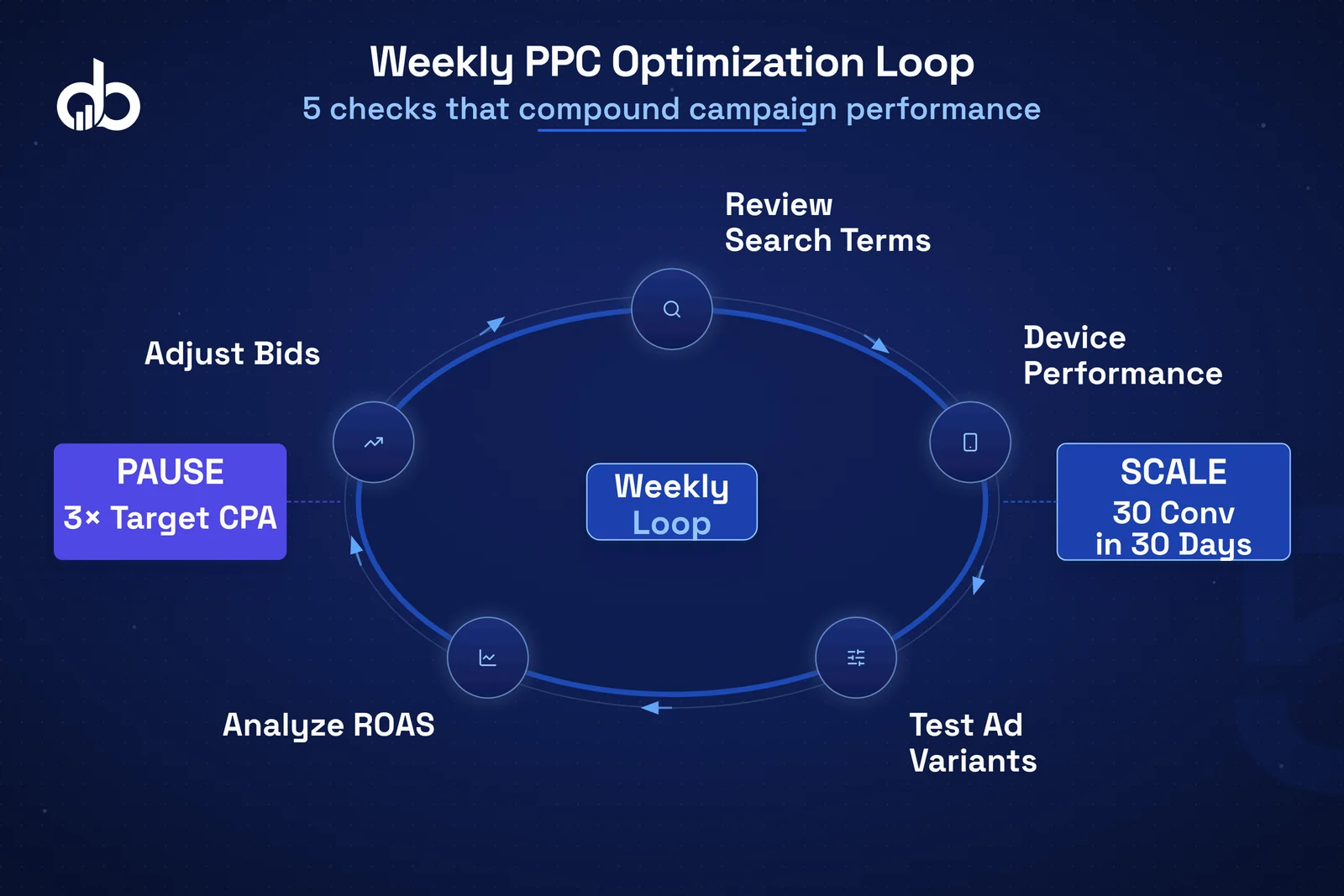
Weekly PPC campaign optimization checklist:
- Review Search Terms report. Add converting terms to exact match. Add irrelevant terms to negatives.
- Check device performance. If mobile is converting poorly, adjust bids or update the mobile landing page.
- Review audience segments. Bid up on segments converting above your target. Reduce bids on segments below it.
- Check ad rotation. Pause underperforming ad variants. Write new tests.
- Compare ROAS by product. Shift budget toward your most profitable campaigns.
When to pause vs. when to scale:
Pause when a campaign has spent 3x your target CPA without a single conversion. Scale when you have at least 30 conversions in a 30-day window and your CPA is below your target.
The core skill in PPC campaign optimization is patience. Change one variable, measure the result, then make the next decision. The teams that build profitable paid search treat it as a system, not a set of one-time decisions.
Digiblazon’s Performance Marketing team runs this optimization loop across accounts in multiple e-commerce verticals. The principle is consistent: measure, test, improve, repeat.
Ready to build a PPC system that compounds results over time? Get Free Marketing Audit
Common PPC Mistakes E-commerce Brands Make
Even with a solid framework, these mistakes undermine results in most e-commerce PPC accounts.
Sending traffic to the homepage. The homepage is built for exploration. PPC traffic needs a focused landing page. Sending buyers to a homepage removes the direct path from ad to purchase and kills your chances of a sale.
No negative keyword list at launch. Without negatives, broad and phrase match keywords will trigger irrelevant queries from day one. This wastes budget and inflates cost-per-click before you have any real data.
Ignoring mobile performance. Over 60% of e-commerce searches happen on mobile devices. If your landing pages aren’t built for mobile speed and usability, you’re burning budget on a channel that can’t convert.
Changing too many variables at once. If you change the headline, the CTA, and the bid strategy at the same time, you can’t attribute the performance shift to any single factor. Isolate your tests.
Pausing campaigns too early. Most paid campaigns need 30 to 60 days before meaningful optimization signals appear. Pulling the plug at day 10 prevents the algorithm from learning.
Optimizing for clicks instead of conversions. Click-through rate is a vanity metric in e-commerce. A 15% CTR with a 0.5% conversion rate is worse than a 4% CTR with a 3.5% conversion rate. Track what matters.
No attribution model before launch. If you don’t set up conversion tracking and an attribution model before your first dollar of spend, you have no basis for optimization. That can’t be fixed retroactively.
Conclusion
A winning PPC strategy for e-commerce isn’t a collection of platform tricks. It’s a sequential system: define your goals, know your audience, choose the right channels, build a keyword architecture, write ads that earn the click, send traffic to pages that convert, measure everything, and optimize without stopping. PPC campaign optimization never ends, and that’s the point.
Most e-commerce businesses skip the strategic foundation and go straight to execution. That’s the gap between accounts that spend money and accounts that make it.
Every step in this guide is built before the campaign launches. Fix the foundation, and the results follow.
Need help building the foundation? Our Performance Marketing team works with e-commerce brands to design PPC strategy frameworks built for real revenue growth, not just impressions.
Your PPC campaigns are running. Make sure they're built to convert. Get Free Marketing Audit
- Define a specific, measurable PPC goal and the KPI that proves it before you open the campaign builder — starting with a budget instead of a goal is the most common and costly e-commerce PPC mistake.
- Build your audience profile before your keyword list — understanding who buys, what triggers the purchase, and where they search is what separates targeted campaigns from spray-and-pray advertising.
- Start with one PPC channel, get it profitable, then add a second — spreading thin budgets across Google, Meta, and YouTube simultaneously produces data too noisy to optimize.
- Map keywords by search intent and build your negative keyword list before launch — transactional keywords deserve the highest budgets, and missing negatives wastes spend on day one.
- The first 30 days are a learning phase — Smart Bidding needs conversion data to optimize, and pulling campaigns before this window closes is one of the most expensive errors in e-commerce PPC.
Frequently Asked Questions
What is a PPC strategy for e-commerce?
A PPC strategy for e-commerce is a systematic plan that defines your goals, target audience, channel selection, keyword architecture, ad copy, landing pages, and optimization process before launching any paid campaigns. It is the foundation that determines whether your ad spend drives revenue or just traffic.
How do I calculate the right ROAS target for my e-commerce PPC campaigns?
Calculate your target ROAS based on your gross margin. If your margin is 40%, you need at least a 2.5x ROAS to break even on ad spend. Factor in customer lifetime value to set a ROAS that makes long-term economic sense for your business rather than just recovering the immediate ad cost.
Which PPC channels should e-commerce businesses start with?
Start with Google Search for high-intent, demand-driven products, or Google Shopping for visual products with clear differentiation. Only add additional channels like Meta Ads or YouTube after your primary channel is profitable. Thin budgets spread across multiple platforms produce data that is too noisy to act on.
When should I pause a PPC campaign that is not converting?
Pause a campaign when it has spent 3x your target CPA without a single conversion. Scale when you have at least 30 conversions in a 30-day window and your ROAS is consistently at or above your target. Most campaigns need 30 to 60 days before reliable optimization signals appear.
What is the most important prerequisite before launching e-commerce PPC ads?
Verified conversion tracking is the most critical prerequisite. Launching PPC without confirmed purchase tracking means your bidding algorithms have no signal to optimize toward. Set up Google Analytics 4, connect it to Google Ads, and verify that purchase events and revenue values are being recorded before your first campaign goes live.